Build Your Business’s Ultimate Responder in ChatGPT
A practical guide for business owners who want to use ChatGPT to save time, reduce repeated writing, improve follow-up, and make daily communication easier.
You can use this guide on your own. If you want help building a stronger version for your business, Practical Ai can help.
Your business already has repeated work hiding in plain sight
Most businesses do not need Ai everywhere. They need help with the work that keeps repeating, getting delayed, or staying stuck in the owner’s head.
A well-built ChatGPT Project gives that work a better place to live.
What is the Ultimate Responder?
An Ultimate Responder is a ChatGPT Project built around your business. It uses clear instructions and useful source documents so ChatGPT can give better answers for the way your business actually works.
A Project keeps useful business context in one place.
It can use your services, tone, FAQs, customer examples, process notes, and common messages to help with work your team repeats every week.
Example uses:
Draft replies, clean up notes, summarize conversations, create checklists, answer common questions, and improve messages before they go out.
How to build your Ultimate Responder
* Requires a paid ChatGPT Plus account ($20/mo.) to use ChatGPT Projects. Go to: https://chatgpt.com/
Follow these steps to create a ChatGPT Project for your business. You do not have to finish everything in one sitting. The more useful business context you give the Project, the better it can help.
Create a new Project in ChatGPT
Name the Project
Download the Ultimate Responder Prompt
Insert the prompt into your new Project
Answer the questions with as much useful detail as you can
When the prompt is done, type DONE
Ask for the Main Project Instructions
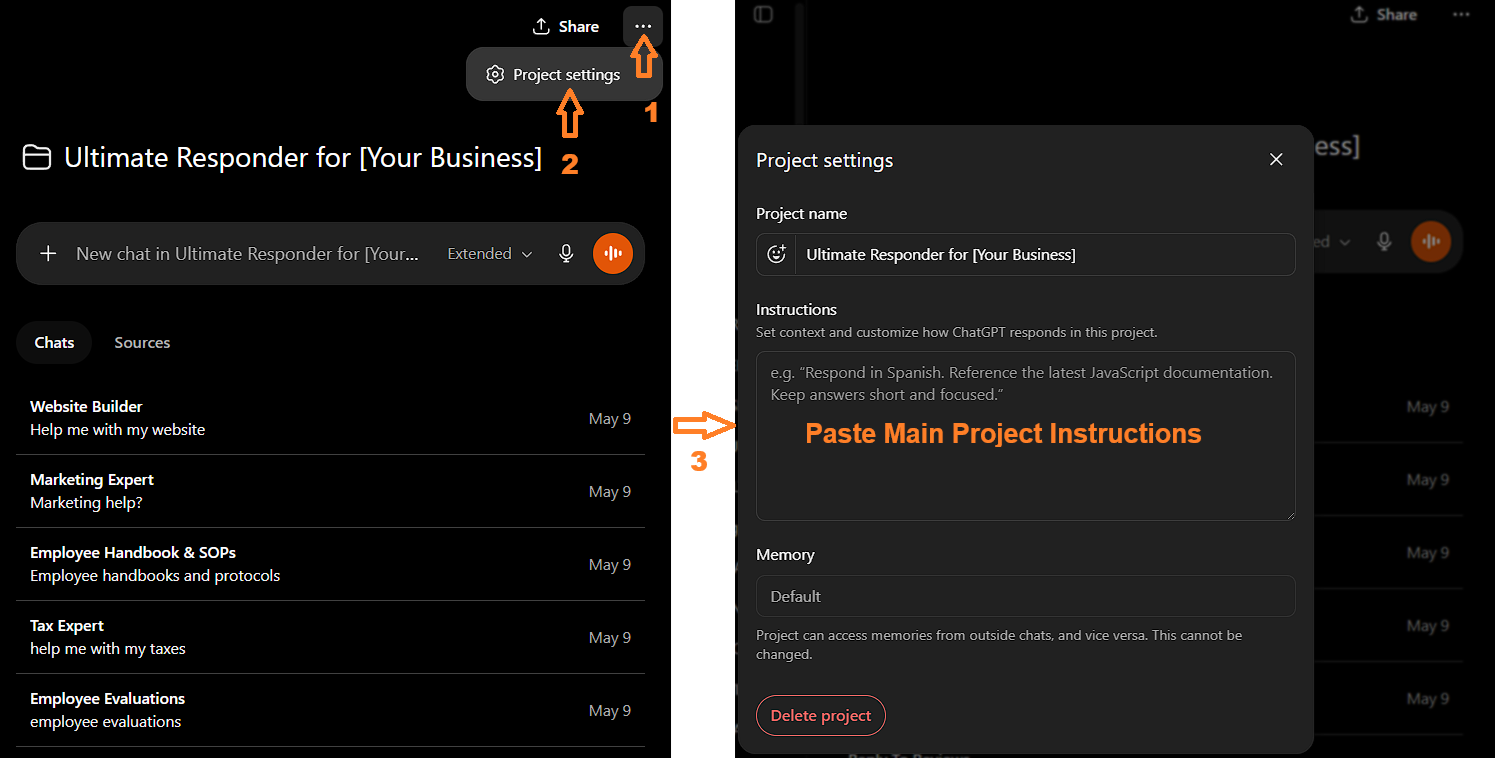
Paste the instructions into Project Settings
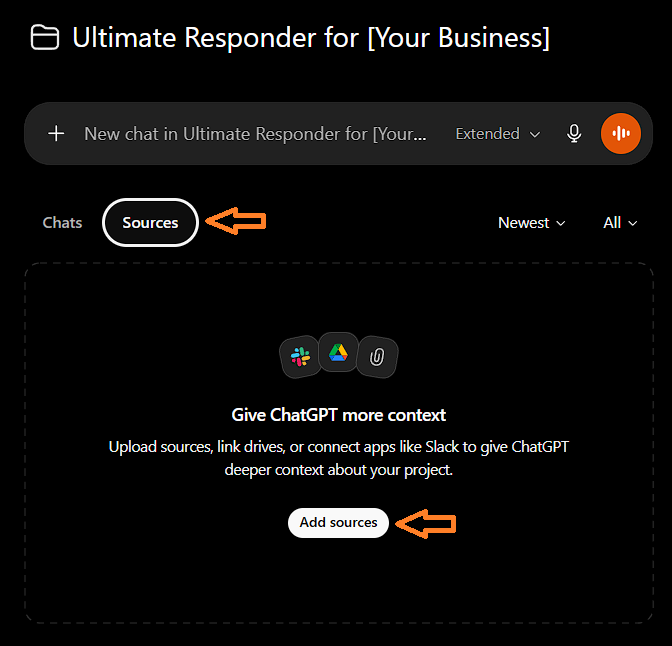
Add source documents
- Website copy
- Service pages
- About page
- FAQs
- Customer emails
- Review examples
- Social media posts
- Sales scripts
- Employee handbooks
- Policies
- Internal process notes
- Common customer questions
- Examples of writing you like
- Examples of writing you do not like
Test it with real business work
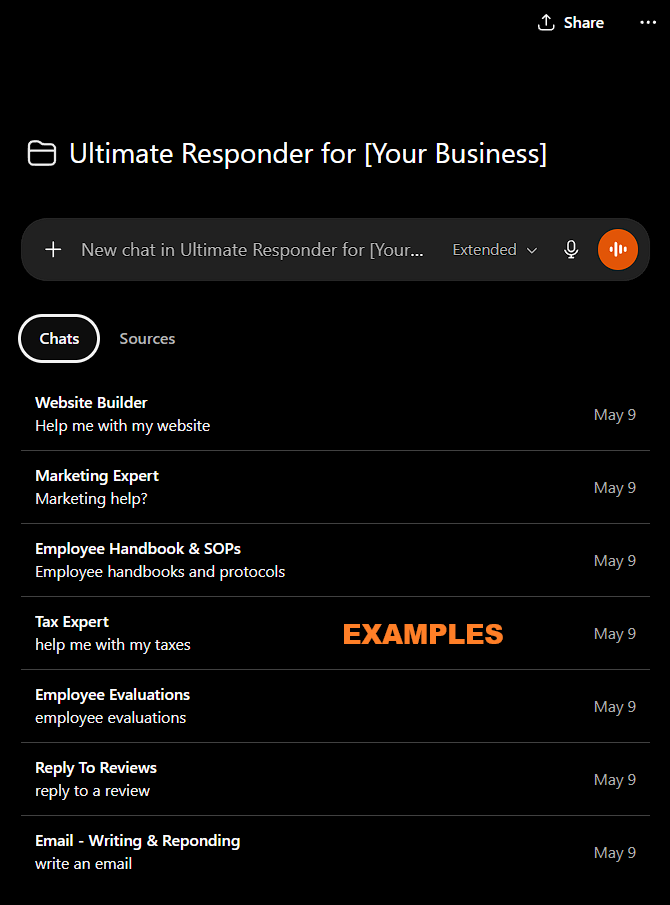
Create separate chats within the project for different types of work
- Email replies and email drafts
- Social media content
- Review replies
- Rough notes turned into cleaner documents
- SOP drafts
- Customer questions
- Employee reviews or staff-related writing
- Meeting summaries
- Follow-up messages
Good first tests for your new Project
Once your Project is built, do not treat it like a search box. Give it real work that repeats in your business.
- Reply to a customer email
- Write a follow-up text
- Answer a common customer question
- Draft a review reply
- Turn rough notes into an SOP
- Summarize a meeting
- Create a social media post from a job photo
- Improve a message before you send it
- Create a simple process checklist
- Turn a messy explanation into clear internal instructions
A simple first prompt to try
After your Project is built, paste this into the chat:
“Give me 10 ways this Project can help my business save time based on the information I gave you. Focus on repeated writing, customer communication, follow-up, internal questions, and business documents.”
Then ask:
“Which one should I start with first?”
That gives you a clear next step instead of staring at a blank chat box.
How to get the most out of your new Project
Your Project will get better as you use it. When it gives you a strong answer, save that style as an example. When it misses the tone, correct it. When your business changes, update the source documents.
Keep your chats organized by task type.
Do not run emails, social posts, SOPs, review replies, and meeting summaries through one messy chat. Create a separate chat for each type of work so the Project stays easier to use.
This helps you:
- Find past work faster
- Keep each conversation focused
- Avoid mixing unrelated tasks
- Build better examples inside each chat
- Make the Project easier for your team to use later
If a task makes you think, “I write some version of this all the time,” that is a good place to start.
Want help building a stronger version?
You can build your Ultimate Responder yourself using this guide. That is the point.
If you get stuck, want a cleaner setup, or want a Project built around your business, Practical Ai can help.
Common ways Practical Ai helps:
- Build ChatGPT Projects for real business use
- Create custom Project Instructions
- Organize source documents
- Build prompt and workflow systems
- Create communication and follow-up systems
- Help turn owner knowledge into usable team resources